Quick answer
To remove a background without uploading the image, use a browser-based tool. CutawayBG runs the AI locally in your browser tab, supports PNG, JPG, WEBP and HEIC, and exports full-resolution results without a watermark.
Try the private background remover →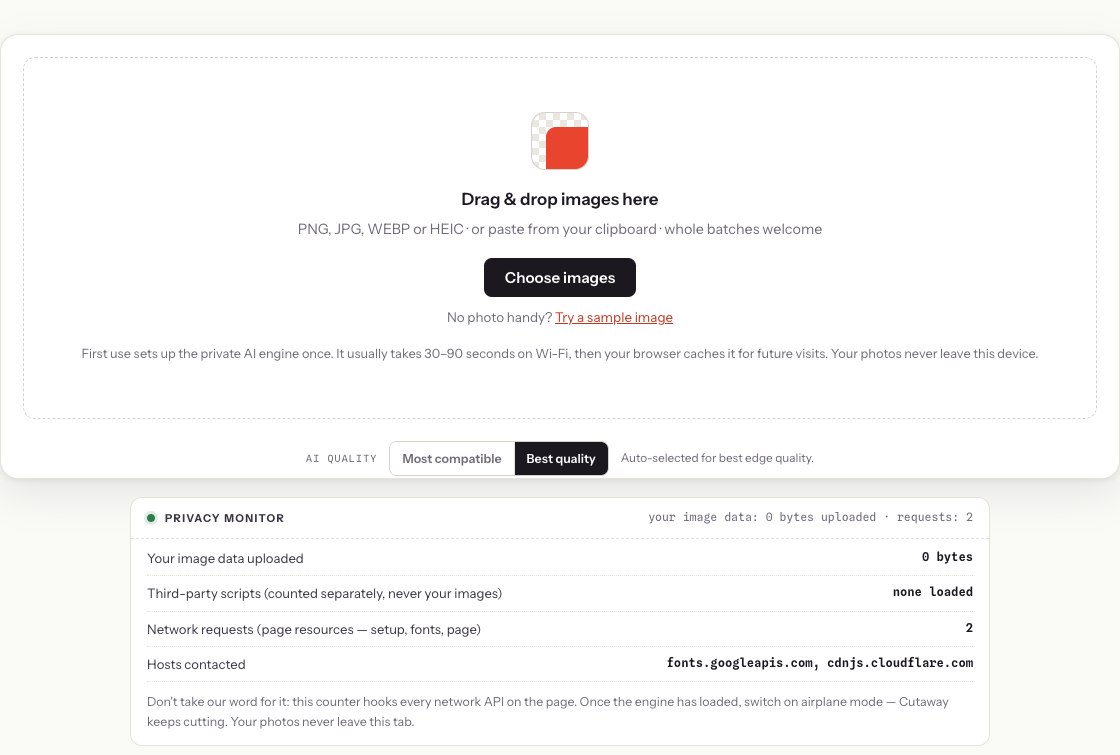
How to remove a background without uploading your image
- Open CutawayBG. Go to the background remover tool in your browser.
- Add your image. Drag in a PNG, JPG, WEBP or iPhone HEIC photo.
- Let the private AI run locally. The first use prepares the model in your browser; future visits are cached.
- Adjust the cutout if needed. Use Sensitivity, Match edges to image, or the Erase / Restore brush for white clothing, soft hair, or pale product edges.
- Download the result. Export a transparent PNG, JPG or WEBP at original resolution.
What does “without uploading” mean?
It means the photo is not sent to a remote background-removal server for processing. With CutawayBG, the image is decoded, segmented and composited in the browser on your own device. The page may load app files and the AI model, but your photo itself is not uploaded for the background removal step.
This is different from many cloud background removers, where the normal pipeline is: you select a photo → it is uploaded to the service's servers → a GPU runs the segmentation model → the result is sent back. That can be fine for casual images, but it is a different trade-off for private or business-sensitive files.
When no-upload background removal matters
- Unreleased products under NDA, where uploading photos to a third-party tool can create avoidable risk;
- Passport, visa or ID photos, where the image is tied to identity documents;
- Family photos, especially images of children or private events;
- Client work for ecommerce, design, HR, legal or medical teams that need tighter file handling;
- Quick edits on shared computers, where avoiding account creation and cloud uploads is cleaner.
No-upload vs cloud background removers
| Question | Browser-based no-upload tool | Cloud background remover |
|---|---|---|
| Where does the AI run? | In your browser on your device | On the provider's server |
| Is the image uploaded? | No upload for background removal | Usually yes |
| Best for | Private photos, product drafts, IDs, client files | Very large batches, enterprise APIs, server workflows |
| Main trade-off | First use needs local AI setup and device speed matters | You trust the provider's upload and retention policy |
| Cost model | No per-image server GPU cost | Provider pays server GPU cost per image |
How cloud background removers actually work
The standard pipeline: you select a photo → it's uploaded to the service's servers → a GPU runs the segmentation model → the result is sent back. Your image, at full resolution, transits and at least temporarily resides on infrastructure you don't control. Most reputable services delete uploads after some window and say so in their privacy policy — but “trust our retention policy” is still the security model, and policies allow more than people assume (quality review, abuse detection, sometimes model improvement).
For a beach photo, that trade is usually fine. It's a different calculation for:
- Unreleased products under NDA — leaking via a third-party tool is still a breach;
- IDs, passports, and documents — the photos most often edited and most dangerous to scatter;
- Photos of your kids — many parents simply prefer these never to touch a server;
- Legal, medical, and HR material — where confidentiality is an obligation, not a preference.
How CutawayBG runs on your device
Modern browsers can run real neural networks via WebAssembly and WebGPU. Cutaway sets up the segmentation model in your browser on first use, caches it for future visits, and then runs inference inside your browser tab, on your hardware. The pipeline has no upload step — not encrypted upload, not anonymized upload, no upload. After the engine is cached, the tool works with your network cable unplugged.
The same architecture explains why it can be free and unlimited: there's no server GPU bill scaling with every image, which is the cost cloud services meter you for.
Don't trust the claim — test it
“Your photos never leave your device” is exactly the kind of claim anyone can type. Three ways to check it on Cutaway, hardest evidence first:
- Airplane-mode test. Load the page once, process one image so the engine caches, then disconnect from the internet entirely. Process another photo. It works — which is only possible if the computation is local.
- Your browser's network tab. Open DevTools → Network, then process a photo. You'll see setup resources being loaded, but nothing outbound carrying your image.
- The built-in privacy monitor. Cutaway ships a live panel that hooks every network API on the page and counts outgoing bytes. It reads zero — and it's wired to turn red, publicly, if any script on the page ever uploads anything.
The page exposes its network hosts and outgoing-body counter in the interface. Model and font files create normal resource requests; the image-processing path itself does not send the selected photo in a request body.
The honest limitations
On-device isn't magic. The first visit needs a one-time setup step; older phones process more slowly than a datacenter GPU; and on the hardest edge cases — flyaway hair against busy backgrounds — the biggest commercial models can still hold an edge. Low-contrast subjects, such as a white shirt on a white wall, may need the Sensitivity slider, Low contrast boost, or a quick restore-brush pass.
For clear subjects, products, and people, current open models are strong enough for everyday work. You're trading a few seconds of patience for a structural guarantee no cloud service can offer: your photo physically cannot leak from a server it never reached.
FAQ
Can I remove a background without uploading the image?
Yes. Use an in-browser background remover such as CutawayBG. The AI runs on your device, and the photo is not uploaded to a server for processing.
Does CutawayBG upload my photo?
No. The background-removal pipeline runs inside your browser tab. CutawayBG also includes a privacy monitor so you can check whether image data is leaving the page.
Is it free and watermark-free?
Yes. During launch, CutawayBG is free, does not require an account, and exports without a watermark.
Which image formats work?
PNG, JPG, WEBP and HEIC/HEIF are supported. HEIC files are converted locally in the browser before background removal.
What if the cutout misses white clothing or soft edges?
Use Sensitivity, Match edges to image, Low contrast boost, or the Erase / Restore brush. These controls are designed for pale products, white clothing and other low-contrast edge cases.
Try it on your own photo — right now, right here
Cutaway runs the AI in your browser. Free, unlimited, full resolution, no watermark, no account — and your photo never leaves your device.
Remove a background free →